This page describes how Standby Deposits, Inc. ("Standby") collects consent to send text messages, what messages we send, and how recipients can opt out. It is provided for transparency to residents, property managers, and mobile carriers.
Who receives text messages from Standby
Standby sends text messages to residents of multifamily properties whose property manager uses Standby to offer a security deposit alternative. We only message residents who have been invited by their property manager or who have provided their mobile number directly to Standby. We never purchase phone numbers or obtain them from third-party lists.
How consent is collected
Consent provided through the property manager
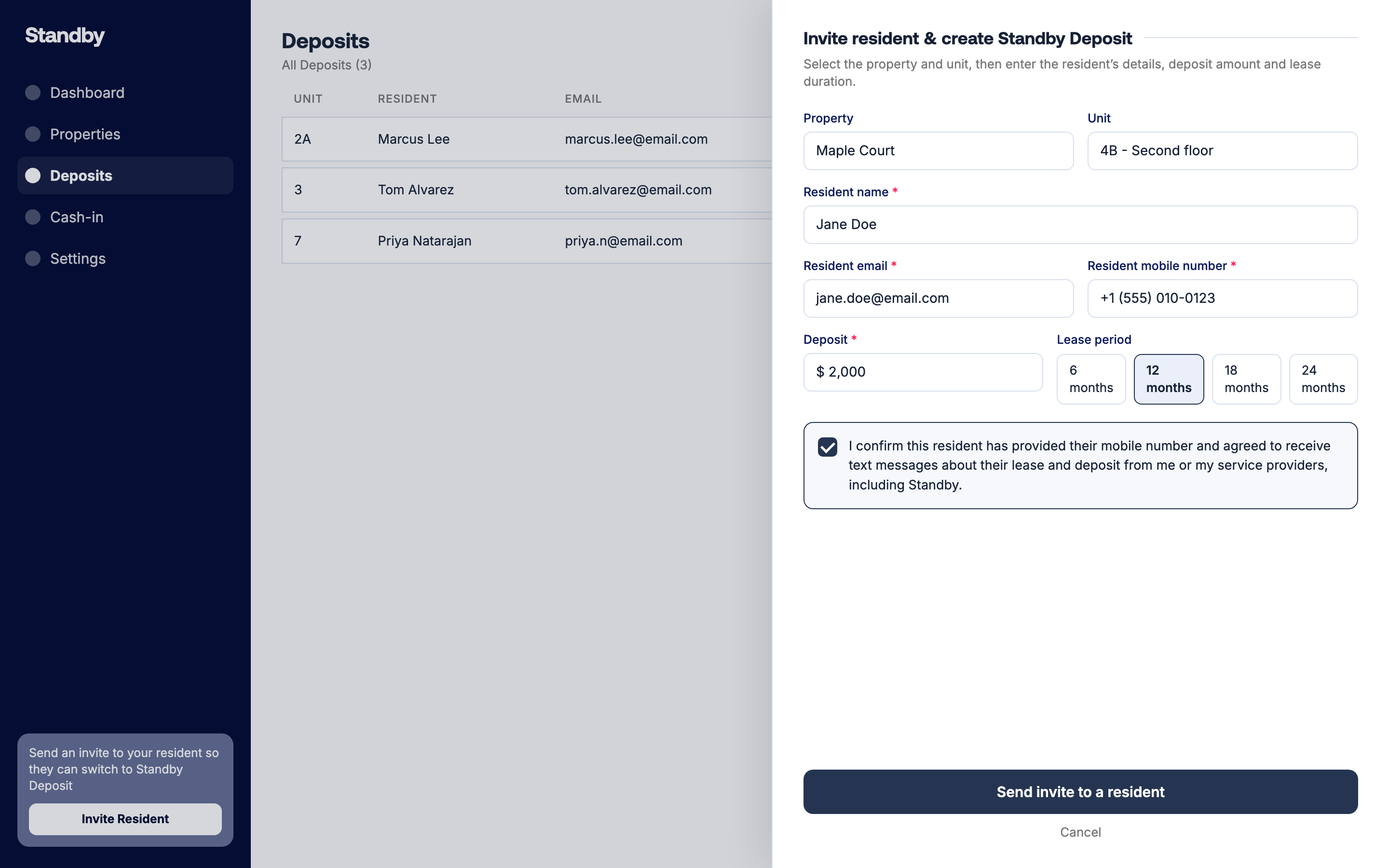
Residents provide their mobile number to their property manager as part of their rental application or lease. Before Standby sends an invitation, the property manager confirms, through Standby's web application, that the resident has agreed to receive text messages about their lease and deposit. This confirmation happens in one of two ways:
- When sending an invitation manually, the property manager must check the following attestation before the invitation can be sent: "I confirm this resident has provided their mobile number and agreed to receive text messages about their lease and deposit from me or my service providers, including Standby."
- When the property manager connects their property management system to Standby, they agree during setup that residents whose records are shared through the integration have provided their mobile number and consented to receive text messages regarding their application, lease, and deposit from the property manager and its service providers, including Standby.
Consent provided directly by the resident
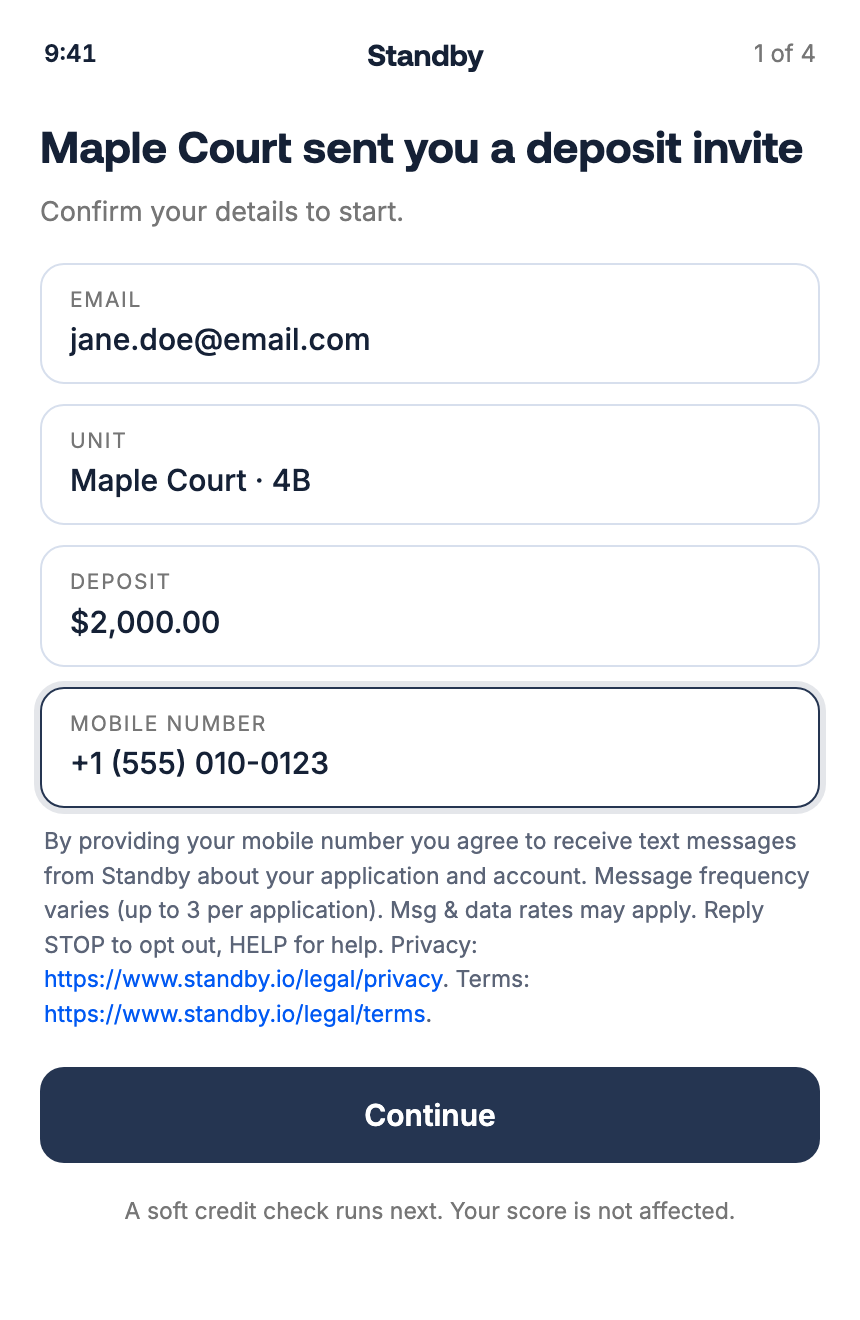
When a resident opens their invitation and enters or confirms their mobile number in the Standby application, the following disclosure appears directly beneath the phone number field: "By providing your mobile number you agree to receive text messages from Standby about your application and account. Message frequency varies (up to 3 per application). Msg & data rates may apply. Reply STOP to opt out, HELP for help. Privacy: https://www.standby.io/legal/privacy. Terms: https://www.standby.io/legal/terms."
What messages we send
Standby sends transactional and account-related messages only. These include:
- A single invitation message when a property manager offers a resident a Standby deposit alternative
- A reminder about a pending invitation, sent only after the resident has opened the invitation
- Application status updates
- Login verification codes
We do not send marketing or promotional text messages. Message frequency varies, up to 3 messages per application. Message and data rates may apply.
Example message: "[Property Name] has invited you to set up a Standby security deposit alternative instead of a cash deposit. See your invitation: https://app.standby.io/i/abc123. Reply STOP to opt out, HELP for help."
How to opt out
Reply STOP to any message from Standby to stop receiving text messages. You will receive one confirmation message and no further texts. Reply START to resubscribe. Standby maintains its own opt-out list and honors it before every message, including when an invitation is re-sent by a property manager. We also honor any text opt-out indicated on your resident record in your property manager's system.
How to get help
Reply HELP to any message, email support@standby.io, or visit https://www.standby.io/contact.
How we handle your phone number
Your mobile phone number, mobile opt-in information, and SMS consent data are not shared with or sold to third parties for marketing purposes. They are shared only with the messaging service providers that transmit messages on our behalf. See our Privacy Policy for details.